Shopify introduced Fall ’26 Editions—a major package of platform updates covering AI commerce, store management, marketing, payments, product data, international trade, and logistics.
There is a lot of news, but its significance for an online store varies greatly. The ability to add more barcodes to a single product variant can ease daily work, but it doesn’t change the fundamental principles of e-commerce. Meanwhile, the ability to discover and purchase a product directly in Google AI Mode or Gemini already indicates a much larger shift in buyer behavior.
Therefore, in this article, we first discuss five Fall ’26 directions that we believe are most important for e-commerce businesses, and review the remaining updates more briefly.
1. AI is becoming a real product discovery and purchase channel
This is perhaps the most important direction of Fall ’26.
Shopify is increasingly connecting merchants’ products with AI channels such as ChatGPT, Google AI Mode and Gemini, Microsoft Copilot, and Meta AI. This entire system is referred to by Shopify as agentic storefronts.
The message itself that the Shopify Catalog already includes more than 1 billion products is not the most important part. What is far more relevant is that this catalog helps the right products be discovered in AI systems.
Google AI Mode and Gemini can now have Shopify checkout
One of the most significant changes in Fall ’26 is Shopify’s integration with Google AI Mode and Gemini.
Until now, AI search mostly helped buyers discover or compare products. Now, some Shopify stores have the opportunity to take another step—the buyer can not only find the product in the Google AI environment but also complete the purchase right there via Shopify-managed checkout. For the merchant, such an order appears in the Shopify admin as a regular order.
This feature is still being rolled out gradually, and currently, direct checkout is primarily available to buyers in the US, Canada, and Australia. The store does not necessarily have to be registered in one of these countries—it is important that it serves these markets and meets Shopify and Google requirements.
Product information is transmitted to Google AI Mode and Gemini via Google Merchant Center or the Shopify Google & YouTube sales channel. Therefore, product data quality becomes especially important here: clear titles and descriptions, up-to-date prices and inventory levels, and shipping and return information.
In other words, for Shopify merchants, Google AI is becoming not just another place where a product can be shown, but potentially a new path from product discovery to purchase.
Not all AI channels work the same way
An important nuance: AI commerce should not be understood as meaning that customers can already complete a purchase directly in a conversation across all channels. For example, Shopify currently uses ChatGPT primarily as a product discovery and referral channel—the buyer can find the product in ChatGPT but completes the purchase at the Shopify checkout. Meanwhile, Google AI Mode, Gemini, Microsoft Copilot, and some Meta experiences can support Shopify direct checkout within the channel itself.
What can be done now?
In your Shopify admin, go to Sales channels → Agentic and check which AI channels your products can be presented in and what checkout options are currently available for your store.
Also, take care of your product data—AI must clearly understand what you are selling, who the product is for, and what its main features are.
We wrote about this in more detail in the article “How to prepare online store products for AI search?”.
2. Sidekick is becoming a real Shopify administration assistant
Another major Fall ’26 change is that Shopify Sidekick is becoming much more than a tool for generating text.
Now Sidekick can perform complex, multi-step tasks and work directly with store data. For example, you can ask it to:
- update products or collections;
- create and modify discounts;
- help with orders;
- create a Shopify Flow automation;
- analyze sales data and perform calculations;
- save frequently used instructions as “skills” so they don’t have to be described from scratch every time.
When performing a complex task, Sidekick plans the necessary actions itself and presents the prepared changes for review before applying them.
This is a significant shift: Shopify AI is becoming not just a content creation tool, but a daily store management tool.
What can be done now?
If you have only used Sidekick for product descriptions or other text until now, try it with a specific administrative task. For example, ask it to analyze sales, update a product group, or create a Shopify Flow automation.
SimGym: AI shoppers can test your store
Additionally, Shopify offers SimGym—a tool where AI shoppers simulate a real shopping journey: browsing collections, viewing products, adding them to the cart, and providing feedback.
You can test one theme or compare two versions of it, for example, before publishing major design or navigation changes.
This can be a useful additional signal for finding problem areas in the store, but AI simulation should not be seen as a replacement for real customer behavior or A/B testing.
3. Product data can be better adapted for different channels
Shopify also introduced product data mapping by channel—a feature that allows assigning different product data to different sales channels directly in the Shopify admin.
For example, the product title in your online store can remain the same, but you can transmit a different version of the title to the Google channel, supplement it with the brand name, or use information stored in a separate metafield. Changes apply only to the selected channel and do not change the main product information in the store itself.
You can also see how many products have the required fields filled for a specific channel and quickly find missing data. Shopify allows you to adjust such fields in bulk via the bulk editor.
Why is this relevant?
The same product can be displayed today in:
- your online store;
- Google;
- Meta;
- Shopify Catalog;
- other sales channels;
- AI search or shopping assistants.
Different channels may require different attributes, titles, or additional information. Until now, this often meant managing separate feeds or additional settings on different platforms. Now, more of this control is being moved directly into the Shopify admin.
The more commerce becomes multi-channel, the less it suffices to simply have a well-prepared product page on the website. Organized, structured product data properly presented for each channel is becoming increasingly important.
What can be done now?
In the Shopify admin, you can open the Channel mapping for a specific sales channel and check which product fields are being transmitted to it, where they are taken from, and if there are any missing values.
If your product data is already complete and suitable for the channels, you don’t need to change anything. However, for stores that actively sell through Google, Meta, or other channels, this new feature is definitely worth reviewing.
4. Shopify strengthens protection against fraud and chargebacks
Fall ’26 focuses significantly on payment risk and dispute management. Shopify can block certain high-risk payments even before they are authorized, and new Shopify Protect capabilities help not only avoid some risky orders but also respond faster when a chargeback is received.
Among the innovations:
- blocking high-risk payments during checkout;
- clearer signals as to why a specific order is considered risky;
- AI-generated responses to chargebacks, tailored to the specific reason for the dispute;
- automatic attachment of proof of delivery to the dispute;
- the ability to create individual fraud rules and test them against previous orders.
According to Shopify, using Shopify Protect results in winning 60% more “product not received” disputes. This is a general metric provided by Shopify itself, so it should not be taken as a guaranteed result for every store. Some new features are also still being rolled out gradually.
This update is particularly relevant for stores that have a higher volume of orders, sell more expensive products, or regularly face fraud attempts and chargebacks.
What can be done now?
Review the fraud signals and current risk management settings shown in the Shopify admin. If chargebacks are a relevant issue for your business, it is also worth checking which new Shopify Protect features are already available for your store.
5. Shopify Autopilot automates more and more marketing actions
Another important Fall ’26 direction is marketing planning and execution directly in the Shopify admin.
Autopilot uses store product, customer, and sales data to suggest specific marketing actions based on your business situation.
Depending on the available channels, Autopilot can help create and manage:
- email campaigns and automations via Shopify Messaging;
- Shop Campaigns;
- Meta Ads;
- Microsoft Advertising;
- Snapchat campaigns;
- X Ads;
- SEO change recommendations that can be reviewed together with Sidekick.
Most importantly, Autopilot is not limited to the recommendation “you should run a campaign.” The suggested action is presented in the Shopify admin as a specific tactic—you can review the channel, audience, expected result, and budget, and once confirmed, Autopilot can create and further manage the campaign itself.
For example, after confirming a Meta Ads recommendation, Autopilot can create a separate Meta Advantage+ campaign and synchronize the necessary product catalog for it. Microsoft Advertising and other supported channels work similarly.
The business still sets the budget, control limits, and how much freedom to give the automation. Some channels or features are also still being rolled out gradually—for example, X Ads is currently in early access.
Does this mean that marketing can be completely left to Shopify AI? For now—no.
Offer strategy, creative direction, budget control, and assessment of real profitability still remain the responsibility of the business. However, Shopify is clearly moving toward a model where more marketing actions can be launched using customer, product, and sales data already present in the store itself.
What can be done now?
If you see Growth → Autopilot in your Shopify admin, open it and review what actions the system suggests specifically for your store. Before turning on automation, it’s worth checking available channels, setting budget limits, and deciding which actions you want to approve yourself.
Other Shopify Fall ’26 updates in brief
1. Canvas – A New Way to Design Your Store
Shopify Canvas allows you to view different store pages and templates in a single visual space and make design changes together with Sidekick.
The tool is still in early access and has technical limitations, so it is worth evaluating them before moving an important theme of a live store into it.
2. Rollouts – Campaign Changes in a Single Launch
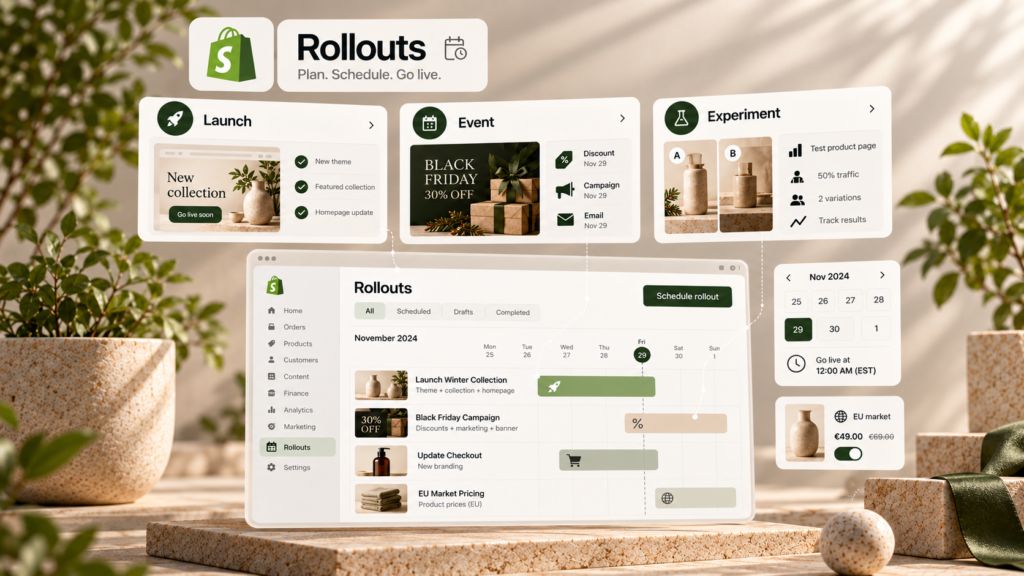
Shopify Rollouts allows you to pre-schedule changes to themes, checkout, discounts, and product catalogs and launch them as a single campaign.
This is especially useful for seasonal sales and other limited-time campaigns where multiple changes need to take effect at the same time.
3. Store Search Is Getting Smarter
Shopify has improved store search and product suggestions shown to the buyer while they are still typing their search phrase.
According to Shopify Fall ’26 data, the updated search experience generated about 8% more add-to-carts from search in their tests. This is a general result provided by Shopify, so specific store results may vary.
You can read more about the Fall ’26 search updates on the Shopify Fall ’26 Editions page.
4. More Convenient Product and Variant Management
Fall ’26 includes several changes that facilitate daily product administration: more flexible collection management, more convenient product and variant editing, and more bulk editing options.
One specific update – now up to 20 barcodes can be assigned to a single product variant. This can be useful when the same product has different UPC, EAN, GTIN, ASIN, or internal codes.
For larger catalogs, such changes can save a significant amount of daily work, although for most stores, this is not a strategic shift.
5. More Opportunities for International Trade
Shopify continues to expand international trade capabilities, including language support and Managed Markets.
Managed Markets can help manage duties, import taxes, localized payment methods, and other international sales processes. Customers can be shown the price with duties and taxes included in advance so that no unexpected additional costs arise during delivery.
These features are most relevant for businesses where foreign markets account for a significant portion of sales. Managed Markets availability depends on the store’s country and other requirements.
6. Shop Is Increasingly Becoming a Separate Sales Channel
Shop is getting more search, content, and shopping features.
For example, store branding can be used on the Shop page, social content can be used to present products, and for eligible Shop users, the cart can sync between the online store, the Shop app, and different devices.
7. Custom Checkout Fields – But Not for Everyone Yet
Shopify is preparing custom checkout fields, which will allow adding extra fields directly to the checkout, such as for delivery instructions, gift messages, dates, or other order information.
Importantly, as of early November 2026, this feature is not yet fully launched. Shopify also indicates that full custom fields functionality will be available on Shopify Plus, while other plans will be able to use simpler “Delivery instructions” and “Gift message” fields.
Therefore, this feature should not be planned as a fully available solution just yet.
8. More Local Payment Methods
Shopify Payments is expanding its selection of local payment methods. Among the supported or gradually implemented options are Alipay, WeChat Pay, Satispay, Scalapay, GrabPay, and others.
However, specific methods depend on the store’s country, the buyer’s market, currency, and Shopify Payments availability.
Therefore, the most important thing is not the list of new methods itself – it is worth opening Settings → Payments and checking which additional payment methods are actually available for your store and main markets.
9. Stock Counts and Fulfillment Innovations
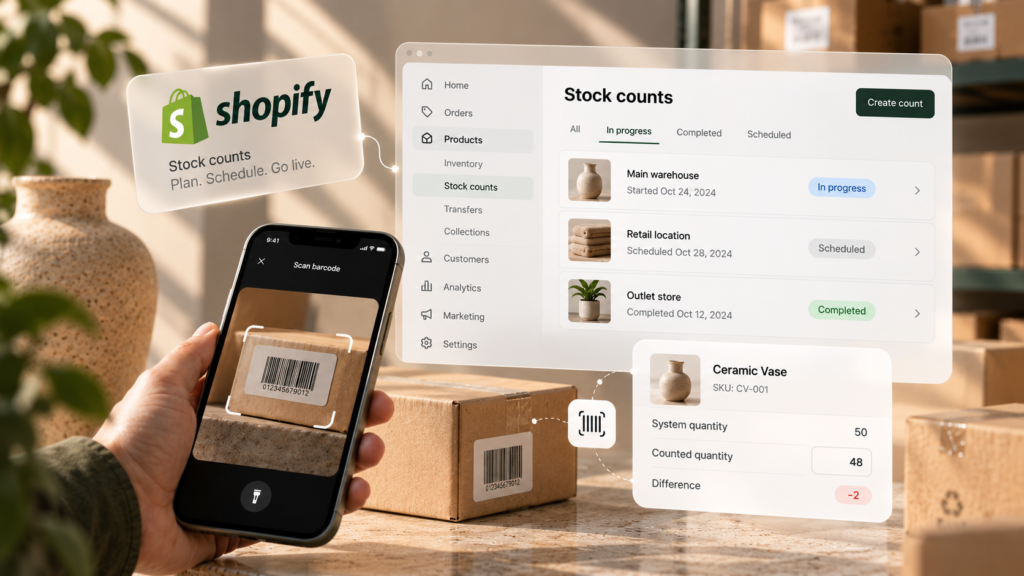
A Stock Counts feature has appeared in the Shopify admin, allowing you to plan physical inventory, record counted quantities, and review discrepancies before updating stock levels.
Fall ’26 also includes several fulfillment updates. For example, DHL Express labels can now be purchased directly in the Shopify admin for stores with eligible locations in the United Kingdom, Germany, France, Italy, and Spain.
Such changes are not relevant for every store, but for businesses that manage larger quantities of goods or fulfillment processes themselves, they can reduce the need for separate tools.
10. Shop and Shop Pay Expand Beyond the Standard Checkout
Shopify is expanding the use of Shop and Shop Pay beyond the standard Shopify checkout. Shop Pay is becoming an increasingly important part of the checkout process in AI shopping channels, and Sign in with Shop can also be used on non-Shopify websites.
At the same time, the Shopify Inbox AI assistant is being improved, which can recommend products, answer buyer questions, and help start the checkout directly from the conversation.
The general direction is clear: the Shop account is becoming not only a tool for faster checkout but also a layer for buyer recognition and personalization across different channels.
What should you check first in your Shopify store?
After such a large package of updates, there’s no need to try to use everything.
To start, we would recommend:
- opening Sales channels → Agentic and checking AI commerce settings;
- reviewing product data quality and Shopify Catalog eligibility;
- trying Sidekick with a real administrative task;
- checking if Growth → Autopilot is available in your account;
- if you face fraud or chargebacks, reviewing Shopify Payments risk and Protect capabilities;
- reviewing new payment and international trade settings based on your main markets.
The most important thing is not to activate every new feature, but to select those that solve a real problem for your online store.
What does Shopify Fall ’26 actually show?
The most important thing about Fall ’26 is not any single piece of news.
The general direction is much broader: Shopify is preparing for commerce that takes place not only within the online store itself.
A product can be discovered in Google AI Mode, Gemini, ChatGPT, Copilot, or Shop. AI can help manage the store itself, and Shopify is connecting more marketing, product data, and operational processes into a single system.
Therefore, in the near future, high-quality product data, seamless work between sales channels, and the ability to select where automation actually saves time will become even more important.
Not every Fall ’26 update will be relevant to every business. However, AI commerce, Sidekick, multi-channel product data, and increasing Shopify automation are directions that e-commerce businesses should already have on their radar.
Frequently Asked Questions
What is Shopify Fall ’26 Editions?
“Shopify Editions” is a large set of Shopify product and feature updates presented periodically. Fall ’26 covers AI commerce, Sidekick, store design, merchandising, payments, marketing, fulfillment, and other changes to the Shopify platform.
What is the most important change in Shopify Fall ’26?
The biggest overall direction is agentic commerce, where Shopify products can be discovered in AI systems, and in some channels, the buyer can complete the purchase right there.
Can Shopify products already be purchased via Google Gemini?
For eligible stores and buyers, Shopify is gradually rolling out Shopify-powered direct checkout in Google AI Mode and Gemini. It is currently being deployed for buyers in the US, Canada, and Australia.
Does ChatGPT support the same Shopify checkout?
Not exactly. Shopify currently describes ChatGPT as a product discovery and referral channel where the buyer moves to Shopify checkout, while Google AI Mode, Gemini, and some other channels can support direct checkout within the AI environment itself.
Are all Fall ’26 features already available?
No. Some features are still being rolled out gradually, are in early access, or are marked as “coming soon.” Availability may also depend on the Shopify plan, country, and features used.